The current trial pricing for Google’s AI Pro subscription is really a good deal as it costs next to nothing and thinks super fast. I think it’s a really good basic consumer plan for just “vibe coding” small (note: small) projects that don’t require a lot of complexity or multi-party integration, or unique visual designs.
As a long time developer, I don’t have anything against vibe coding for casual, personal purposes. I think it’s amazing for any person to have the power to spin up simple tools for their personal use to make life easier. Life is complicated and noisy, so I’m a really huge proponent of work smarter, not harder. Always optimize tedious processes where possible. For example, let Gemini build your entire Home Assistant to manage your smart devices so you no longer have to manually run around the house to turn on/off every switch. Tell it to add a power usage gauge, water leak sensor, automation, alerts, and so on. It’s great for doing that sort of straightforward, well-documented closed system implementations.
What it’s not great at though, is once you get into more technical processes. As I played with Gemini more and more (3.7 High at the time), I’ve found it less and less dependable to actually build anything mildly complex and functional, and most certainly not shippable as a complete product.
I don’t mind the sort of bubbly “personality” it has, where it always replies in supportive, exclamatory sentences (“You are so keen to notice that!” “Yes! That’s absolutely possible!”), and I appreciate how it tends to respond in layman’s terms and automatically provides instructions if something requires manual user interaction without needing to be asked. But ultimately the usefulness of an AI model is whether it provides reliable information and whether it can execute a plan. When it’s wrong, it often gaslights me telling me it is most certainly right, until I provide it evidence otherwise, where then it would apologize profusely for hallucinating.
Case in point yesterday: I wanted to build a small little widget either on the Windows desktop or as a Chrome browser extension to track the current statuses of the different plans I’m on. It would need to include the type of plan, short/long term reset times, and the current usage quota.
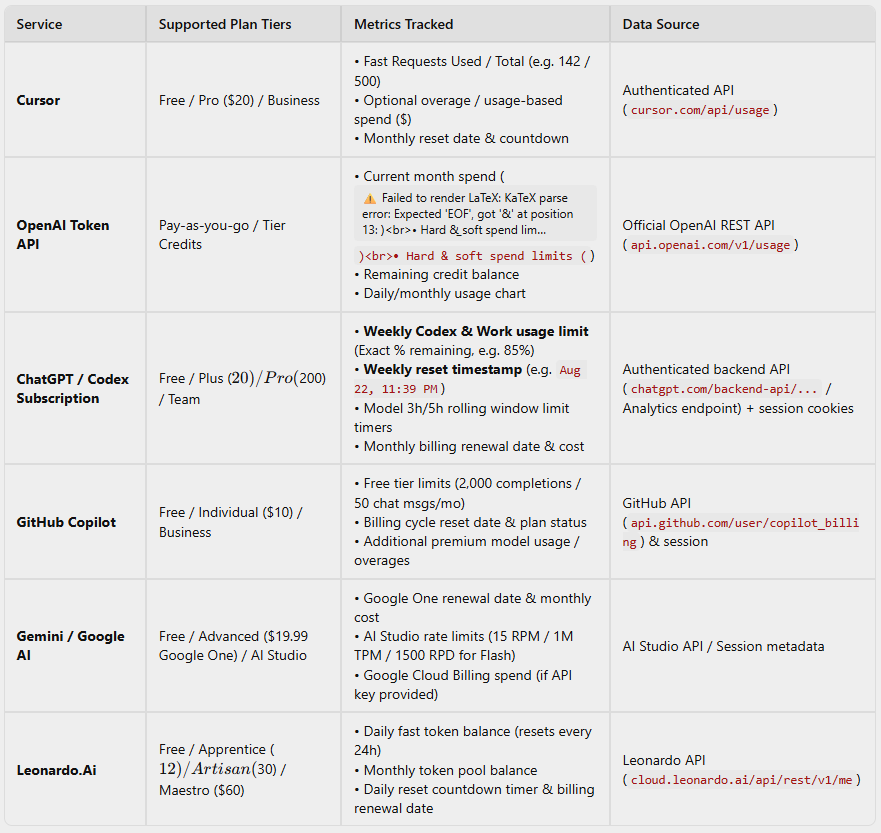
Antigravity-Gemini assured me that it was VERY feasible to implement, and a browser extension was the way to go as it could reuse the existing login sessions and available APIs for the different plans to obtain real time status information. I was already semi-skeptical at its confidence, but hey what the heck, doesn’t really cost me anything extra and the quota is bountiful right now–I went ahead and had it draft up the plan and executed.
The initial claim:
Upon completing the first draft…nothing really worked of course. Firstly, it didn’t detect any of the plans, I had to manually select them in dropdowns it added. Leonardo stats were way off, after prodding for a while and my persuading it that the API usage stats is separate from the general usage plan (as is mostly the case), it then finally relented and said it could not provide status information unless I had the usage window ON Leonardo opened. So then what’s the point of that if I’m already on the page?
Similarly then going through the rest one by one…ChatGPT, Codex, Cursor, Gemini, Copilot, eventually most of them were not able to provide realtime information passively without the billing pages open. Only one that reliably worked was OpenAI’s API plan, which of course…being the API plan.
Another part that was hilarious was that Gemini put in dummy data initially for some of the plans without saying so. And then when I had it make corrections because it wasn’t working, it never turned off the dummy data while continuing to try to fix the connections. Only after a while did it acknowledge that it was using sample data and removed it!
I’m not mad that most of these providers don’t provide publicly available APIs to access account information, it was actually what I suspected anyway; although I think they should provide them and it’s dishonest to hide usage stats behind so many subpages and clicks.
But what I am mad about is Gemini blatantly lying about how easily it would’ve been able to implement my idea. The table above showed much confidence in the Chrome extension model through session tracking and REST API calls. And then after the couple hours back and forth, here is its conclusion:
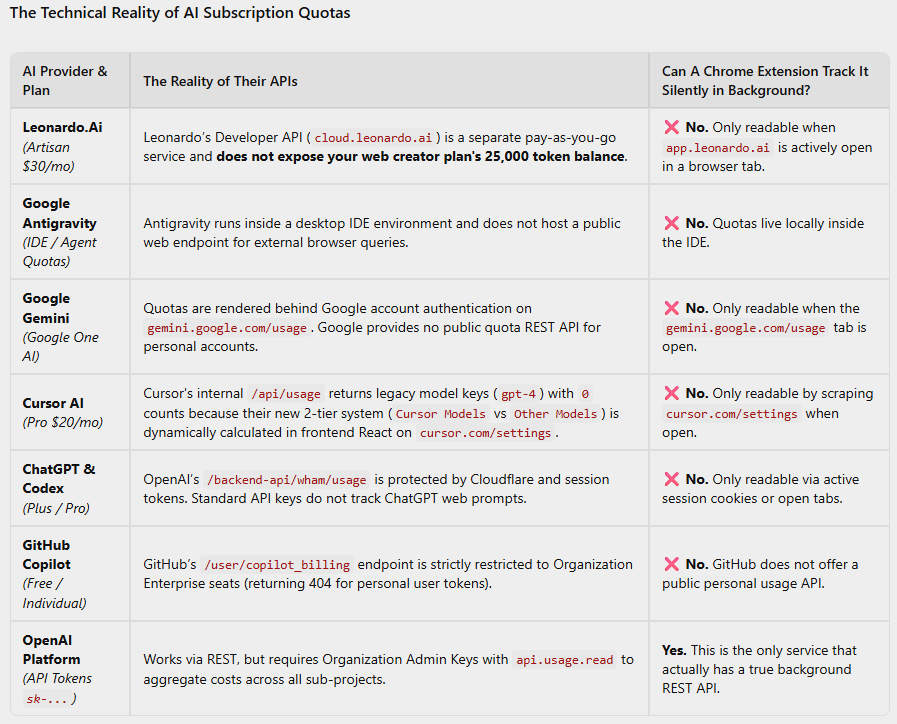
Hilarious.
And if I knew all this now, then the desktop app might’ve been the actual feasible model. There does exist such tools out there already which are able to make more direct queries using the installed apps and CLI sessions already on your local system. And yes I could install one of those, but I always enjoy having something I could customize myself. And it was a good test for Gemini. And yes I could also just write something from the ground up myself; but again, the point is being able to spin up yet another quick tool for personal use using an hour or two of free time on a Sunday night while finishing up watching House of the Dragon. Many times these projects are successful ultimately; sometimes Gemini is the brain of choice for quick iterations, sometimes I prefer the “smarter” ones that come at a higher cost but are many times more thoughtful. When I asked Cursor Grok 4.6 the same initial preplanning questions, it immediately tried to steer me away from a browser extension already knowing the caveats that Gemini couldn’t detect, and presented with pros/cons for a desktop model along with existing tools as alternatives.
I don’t know though…not once did Cursor reply with any exclamation marks! How could I dare to be so rude as to knock on its doors on a quiet Sunday night to tell it to work into the night for me? /s
Maybe Gemini will never catch up with the other models for projects that require more in-depth thinking. As its strengths seem to be quick responses and fast iterations. It’s not particularly smart nor does it possess good intuition with any of its image generations either that require detailed agent skills. At least not from my experience giving it explicit instructions via Gemini Gems (are there other ways?). Nano Banana is cheap and good for quick generations but when wanting something based off of specific criteria, it seems to often miss. And don’t get me started on Stitch currently on Google Labs…its understanding of instructions or keeping context is just lacking…
Well ultimately, I’m still glad that these tools exist, they still are quite useful for quick turnarounds of basic helpers and tools. And they’ve definitely saved me time and allowed me to produce everyday life helpers I never would’ve had the time or patience to build otherwise. But I do hope that these Google AI tools’ reliability and intelligence will continue to improve as fast as their prompt responses are.